
Available to Basic Payroll, Full Service Payroll
When you run payroll, the way you fund your payroll will determine your payroll run deadlines.
Typical ACH Option: Patriot will collect money from your business bank account after payroll is run. Direct Deposit customers start out with 4-day ACH timing. Two-day ACH funding is available for customers with a well-established history of successful collections upon request.
Prefund Option: Patriot will collect money from your business bank account ahead of time, so it will be ready to send to employees faster. You can process payroll as little as one day before the pay date. For more details about how prefunding works and disabling prefund for a payroll, see Using Prefunded Direct Deposit.
Ways to Fund Your Company Direct Deposit
Normal ACH collections
Bank Wire
Instant Payment -- Instant payment is available only to fund direct deposit, not to send direct deposit to employees.
Important notes:
You can also wire funds or send an instant payment to Patriot as late as one banking day before the pay date. The deadline for wiring money to Patriot is 3:00 PM ET the day before the pay date. See Wire Instructions for Patriot Software Direct Deposit.
Wire transfers are available for a fee of $15 per transfer, and Instant Payments via the RTP Network are available for a fee of $5 per transfer.
In all cases, your deadline for processing payroll with direct deposit will be 8:00 p.m. ET, although we recommend not waiting until the last minute, in the event of an unexpected technical delay.
The transaction on your bank statement will read “Patriot Software Payroll” for direct.
Direct Deposit Timing
Patriot will collect the money from your business bank account after you run payroll, confirm the collection is successful, and then send the money to the employee bank accounts.
Important Note for Full Service Payroll & Direct Deposit Users:
Your payroll funds will be withdrawn in two separate transactions on different days.
Tax Collection: Occurs 1 banking day before the pay date.
Direct Deposit Collection: Occurs 4 banking days before the pay date (subject to standard ACH timing).
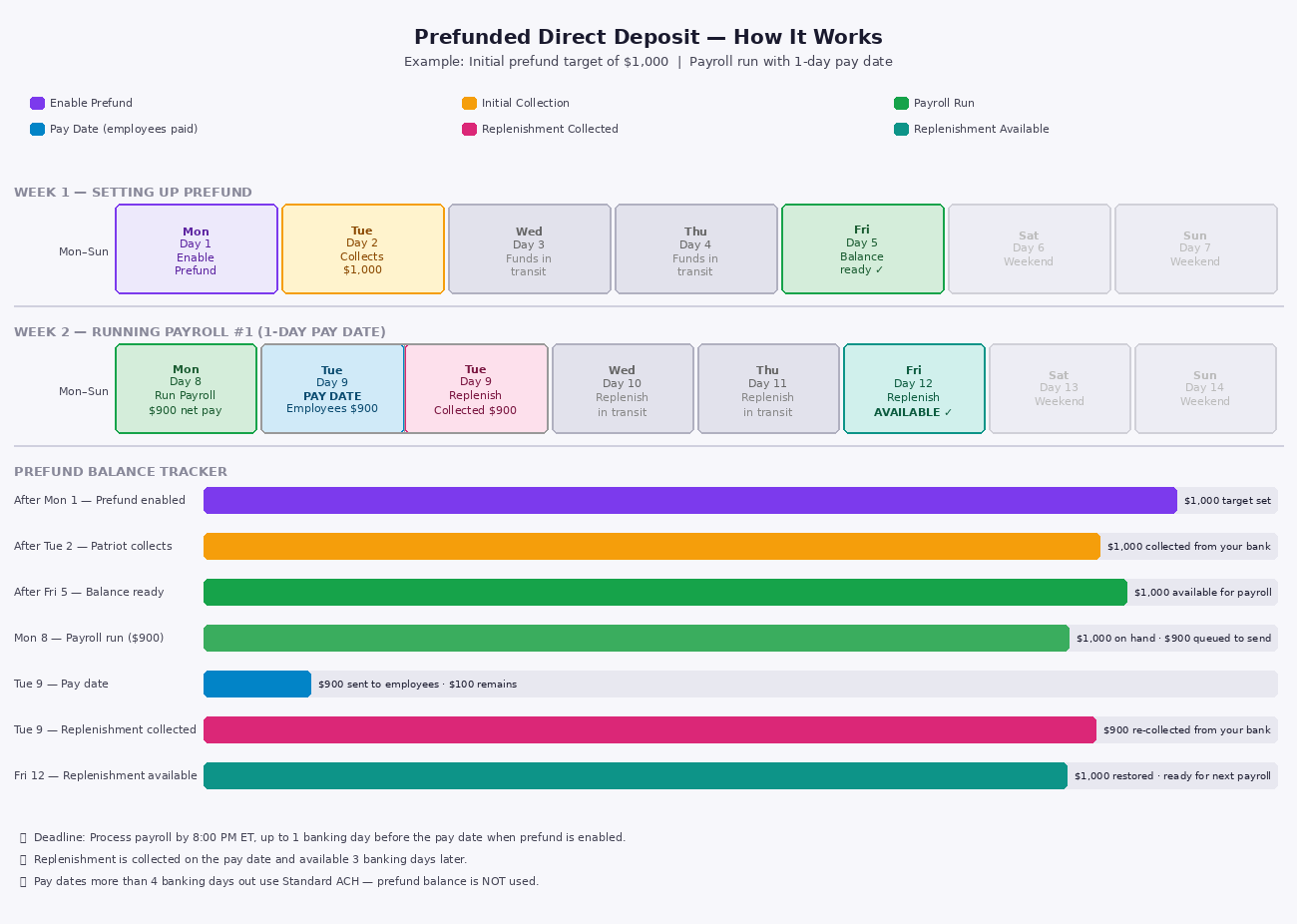
Prefunding Cycles: If you enable prefunding, your first collection happens the day after setup. Moving forward, funds are collected on your pay date to replenish your balance.
Verify your Direct Deposit Collection Date
Before payroll is approved
When running payroll the collection date will displayed on payroll step two before you approve payroll, so you can verify the date when the debit will occur.
Direct Deposit Details Report
You can also view and verify collection dates by running the Direct Deposit Details Report. Navigate to Reports > Payroll Reports > Direct Deposit Details and adjust the date range as needed to see pay dates, collection dates, and amounts.
Standard 4-Day ACH Direct Deposit
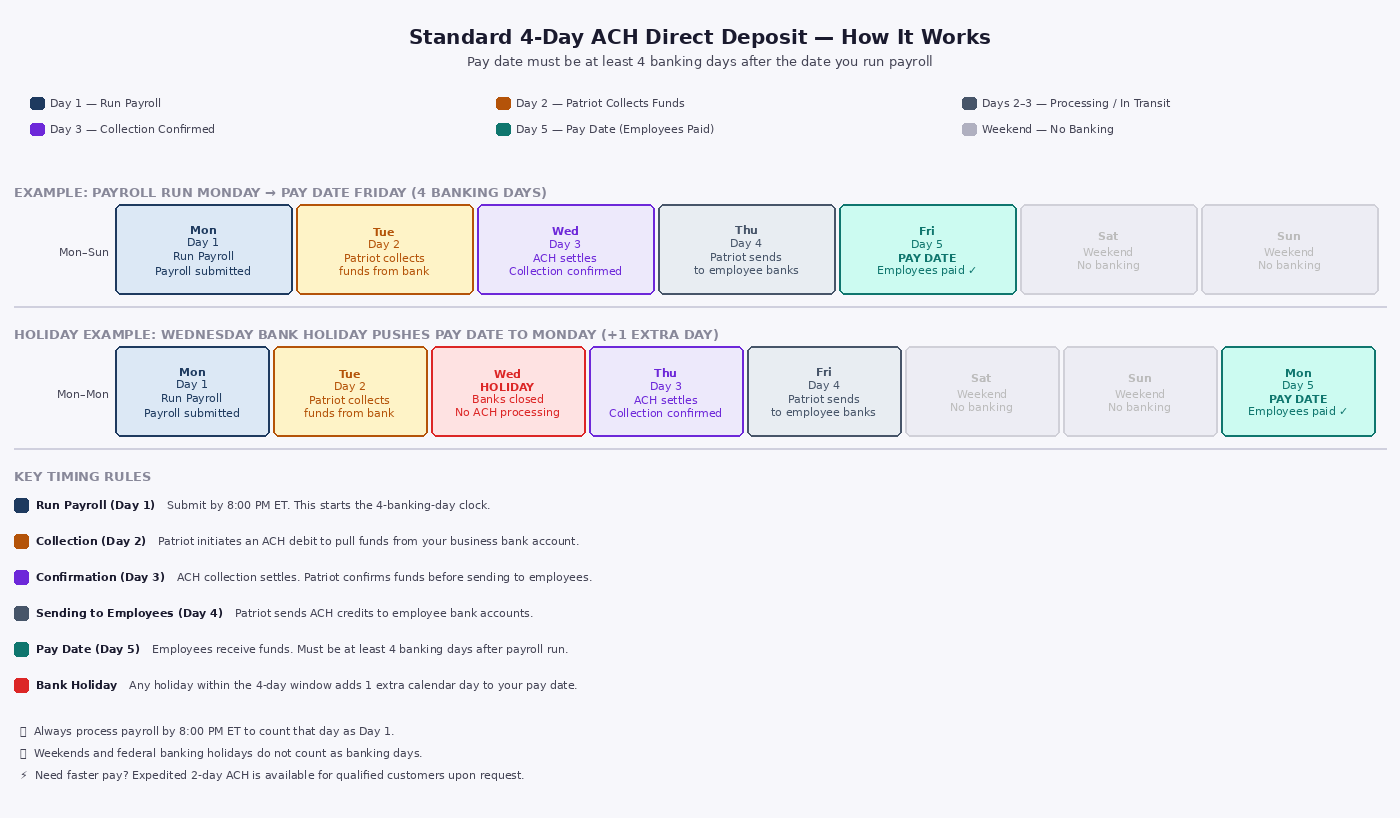
When you use the Standard Option, the pay date must always be at least four (4) banking days after the date you run payroll.
4-day ACH Example
Here is an example of how 4-day direct deposit works.
On Monday - You run a payroll before the cutoff time using regular ACH Funding, and set the pay date to be Friday. You must always make the pay date at least 4 banking days after the payroll run date. When a bank holiday falls during the week, you will need to run payroll 1 banking day earlier.
On Tuesday - Patriot withdraws payroll from Company's business bank account. The collection always happens three banking days before the pay date. If the payroll is run more than 4 days in advance, the collection will not occur until 3 days before the pay date.
On Wednesday - Funds are "in flight" through the ACH network. While "in-flight," the money has not technically moved into the final account, meaning the transaction could still be rejected or returned.
On Thursday - Patriot receives the money and confirms a successful collection.
On Friday - Payday! The employees your company are paid. The pay date must always occur at least 4 banking days after the payroll run date.
Click to enlarge image in new tab
Expedited 2 Day ACH Direct Deposit
Two day direct deposit is only available for established, well-qualified customers upon request. Well established customers will have several successful direct deposit collections with no failure history. Please contact our support team to see if you are eligible or email [email protected]. After completing three successful 4-day collections, you may be eligible for 2-day direct deposits. Funds are debited one banking day prior to the pay date for 2-day ACH. Additionally, eligibility requires being a direct deposit customer for at least 30 days.
You must process and approve payroll at least 2 banking days before the pay date.
Note on Timing: Even if you are approved for 2-day expedited ACH, we will not expedite your direct deposit collection if you submit payroll early. Running payroll well in advance allows the system to process normally, with collection occurring the next banking day—up to 4 banking days before your pay date.
2-day Expedited Direct Deposit Example:
Here is an example of how 2-day direct deposit works.
On Wednesday - You run payroll for a Friday pay date before 8:00 p.m. ET
On Thursday - Patriot withdraws payroll from Company's business bank account.
On Friday - Payday! Your employees are paid.
With 2-day expedited direct deposit Patriot has not received or confirmed successful collection until after your employees have been paid.
Maintaining Eligibility
Eligibility for 2-day direct deposit is not permanent. If your account experiences issues such as failed transactions, you will be reverted to 4-day processing for 30 days. To regain eligibility, you must complete 3–4 successful collections at 4-day timing with no failures. Additionally, if a collection fails after employees are paid, you must reimburse Patriot for the amount paid to employees.
Banking Holidays
It’s important to be aware of your direct deposit timing and banking holidays for payroll. When a bank holiday falls within a payroll week, you will need to add an extra day to your process.
Weekends aren't considered banking or business days primarily because the Federal Reserve, which regulates and clears the majority of U.S. financial transactions, is closed.
For more details, see Patriot Direct Deposit Bank Holidays.
Direct Deposit Payroll Planner Tool
Clicking the button or image will open the planner tool in a new tab

Use the planner tool below to help determine your payroll run date or pay date based on your ACH timing and banking days.
Prefunded Direct Deposit
When you use the Prefund Option, Patriot has already collected money from your business before you run payroll, so you can pay employees quickly. Once your current prefunded balance is established, you can make the pay date either one, two, three, or four days after the date you run payroll. Any pay date over 4 days will use the Standard option, and your prefunded balance will not be used. For more details, see Using Prefunded Direct Deposit.
Funds are collected on the initial collection date during setup. Afterward, funds are collected on each pay date.
Here is an example showing setting the initial prefunded balance to $1000 for the first time.
Click to enlarge image in new tab
The transaction on your bank statement will read “Patriot Software Prefunding” for all prefunding collections and refunds.
How to Turn Off Direct Deposit for a Payroll
To turn off the direct deposit for one payroll,
Go to Payroll Step One (Payroll > Run Payroll)
Change the Direct Deposit radio button from Enabled to Disabled.

The payroll run will not have direct deposit, and you will need to print or handwrite paychecks.
The Direct Deposit setting will return to Enabled after the payroll run.